
Google brought Gemini 4 Hydrogen to Search and started rolling it out in the Gemini app on Nov. 12. The change reaches people who do not pay for a Google AI plan, but the two products give those users different controls. In Search, Hydrogen runs behind AI Mode. In a free Gemini chat, Google can pick Hydrogen for a particular prompt while using a lighter model for others.
Hydrogen also has a separate developer release. If you use Search or the Gemini app, the developer rates do not apply to those interactions. They matter when a program calls the model through Google's API.
Where to find Hydrogen in Search
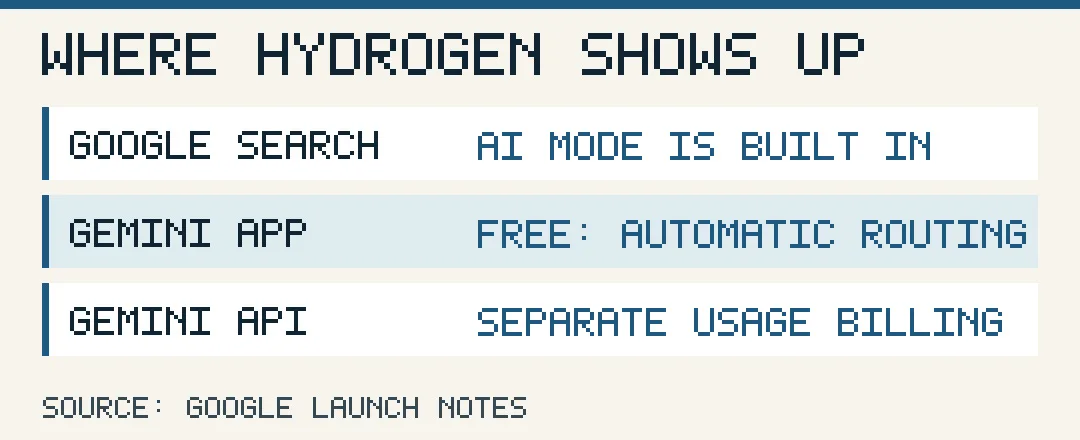
To try the update, enter a question on Google and choose AI Mode below the search bar. The regular results page may show an AI Overview, a summary above the links. AI Mode opens a conversation where you can ask follow-up questions and see the sources Google used. There is no need to buy a plan or select Hydrogen to get the standard Search upgrade.
The Search announcement says the model can split a question into related searches and bring the results together. A question about walking shoes for hot weather, for example, might call for information about materials and fit alongside product listings. Google posted a short demonstration of a shoe search. The comparison appears in the answer itself, with links readers can follow to check the underlying details.
That is useful when several conditions need to hold at once. If an answer gives you a price or says a store has a specific size, open the listing before relying on it. Google's AI Mode help says the feature can misinterpret sources or miss context.
How to tell what the Gemini app used
Google's Gemini model guide says free accounts use Flash-Lite for most prompts when automatic selection is on. Gemini can send a question that needs more reasoning to Hydrogen. With automatic selection off, free accounts use Flash-Lite. A free user looking for a permanent Hydrogen switch in the picker may therefore see only Auto or Flash-Lite.
To check a particular answer, open its More menu and choose See response details. The model listed there applies to that answer. A follow-up in the same conversation can use a different model when automatic selection is on. Paid users can select Hydrogen manually for chats, subject to their plan and usage limits. Google lists Argon for Pro and Ultra, and Carbon for Ultra. Carbon's Nov. 10 release has its own app and Search access rules.
What the API costs
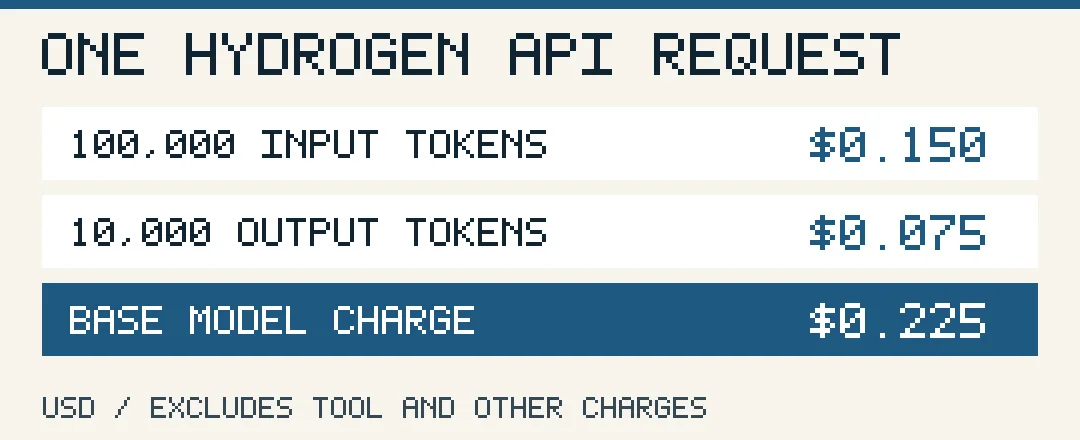
The Gemini API price list includes a free tier for Hydrogen. On the paid standard tier, Google charges $1.50 per million input tokens and $7.50 per million output tokens, including billed thinking tokens. The launch rates apply across Hydrogen's one-million-token context window. Tokens are the units Google uses to meter what a program sends and what the model processes or returns. Output billing can include tokens that do not appear in the visible answer. For example, if an integration shows a short summary after a longer reasoning step, the size of that summary alone will understate the billed output. Use the request’s usage figures when comparing models on the same job.
At those rates, 100,000 billed input tokens cost $0.15 and 10,000 billed output tokens cost $0.075. The base model charge would be $0.225 before any separate tool charges. The same token counts would cost $0.30 on Carbon or Argon at their introductory rates through Nov. 30 and $0.60 at the rates Google lists from Dec. 1. These figures compare the same token counts. A model that spends more tokens on a task can change the actual bill.
For developers, Google's pricing page also lists separate terms for Search grounding, which lets an API call look up web information. Check those terms before estimating the cost of a workflow that searches the web on every request.