
Apple’s $299 HomeView goes on sale in the United States on Friday, November 13. The smart display can recognize up to six enrolled people, then switch to that person’s home screen. A guest can set a timer or play music on the same device. Getting to someone’s Messages or Calendar takes more than standing in front of the screen.
In a security disclosure published Thursday, Apple explained what happens between the camera seeing a face and the display recognizing it. The distinction matters in a kitchen or living room where people will pass the device throughout the day, including visitors who never set up a profile.
What the camera and microphone do
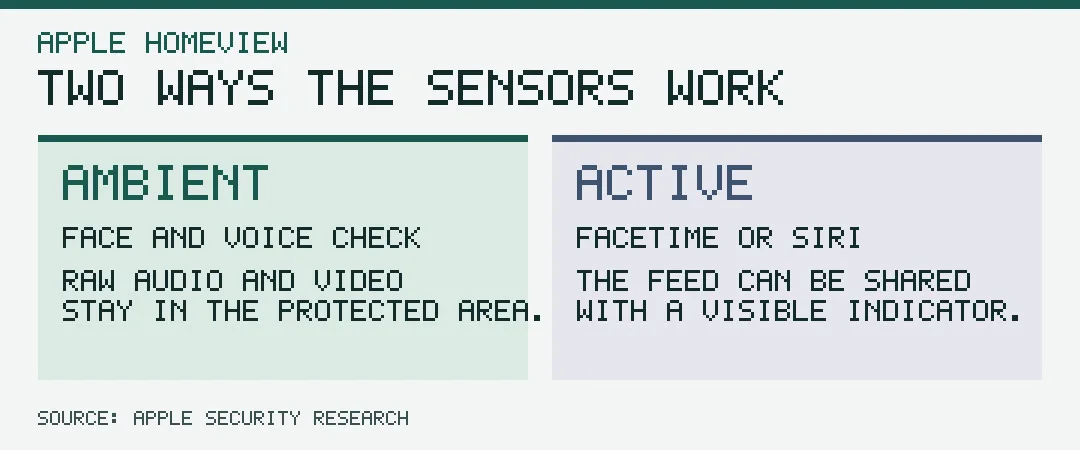
Apple describes two modes. In the background, HomeView does enough visual processing to detect a person in view. Its recognition software compares face and voice information with the profiles people enrolled. That work happens in isolated parts of the A18 chip called Secure Exclaves. Apple says the main operating system receives a person identifier, position and confidence score from recognition, while the audio, video and biometric information used to make the match stay inside the protected area.
An active session uses the sensors differently. If you start a FaceTime video call or speak to Siri, the device can share the relevant sensor feed with the software handling the call or request. Apple says its design verifies that a camera or microphone indicator is visible before allowing that broader access. A display that has no indicator lit can still be doing background recognition, because the indicator signals active sensor access.
Apple also uses the architecture to protect the camera and microphone indicators in devices including the iPhone 18 Pro. The HomeView disclosure describes the system’s design. It doesn’t establish how often the display will correctly distinguish similar faces or voices in an ordinary household.
When Messages and Calendar appear
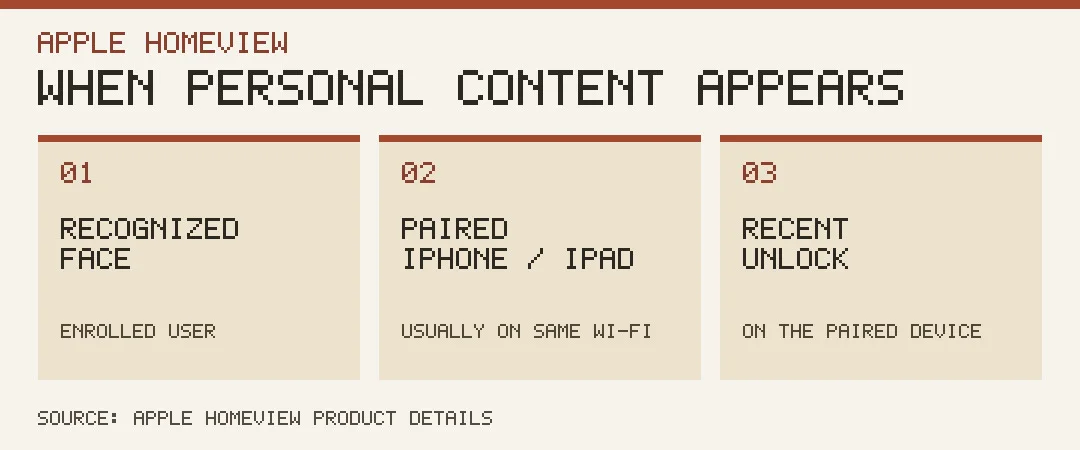
According to Apple’s product details, a full profile requires an Apple Account, a compatible iPhone or iPad and membership in the shared home in Apple’s Home app. HomeView needs to recognize the person’s face before showing their personal content. Normally, the paired device also needs to be on the same Wi-Fi network and to have been recently unlocked.
Apple describes an exception if the paired device drops off Wi-Fi. Personal information can still be available if the paired device was recently on that network, is still in the same location, has active cellular service and was recently unlocked. Face recognition still applies. Turning off Wi-Fi on a phone is therefore an unreliable way to check whether a nearby HomeView can show personal information.
Guests and people the display doesn’t recognize can still check the weather, set a timer, play music or use available smart-home controls, Apple says. For a household interested mainly in those shared functions, there’s no need to enroll every visitor or give every person a profile.
What you need to buy or already own
The tabletop and wall-mounted displays both start at $299. The launch announcement lists the separate USB-C wall connector at $59.95 and the AC wired mount at $79.95, bringing those two wall installations to $358.95 or $378.95 before taxes or installation. The tabletop version avoids the wall-mount purchase. Apple’s product page also has a film introducing HomeView.
Setup and multiuser support require a compatible iPhone or iPad running current software. Siri can answer general questions on HomeView, but personal-context Siri requests require a paired Apple Intelligence-enabled device with Siri AI turned on and set to a supported language. A compatible security camera and eligible iCloud+ subscription are separate requirements for features such as video summaries of recorded security footage. Check those requirements against the jobs you want the display to do before buying a mount or adding a camera.