If you keep Chrome open for days at a time, check its version and restart it if an update is waiting. Google began rolling out a desktop update on Nov. 9 and says an exploit for one of the flaws it fixes already exists in the wild. The company identifies that flaw as CVE-2026-125350 and rates it high severity. Google’s desktop release notes
Which version should you see?
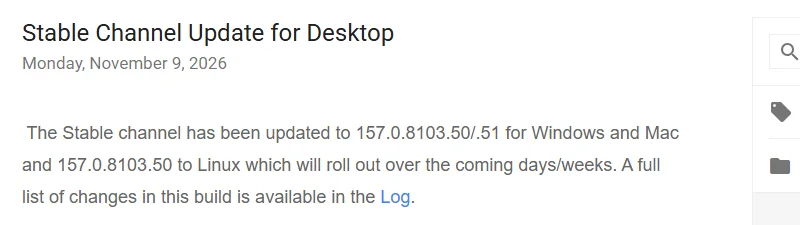
The numbers below are the stable desktop builds Google listed on Nov. 9. A newer stable build can also include the fix. Check the full version number: two installations can both say Chrome 157 and still be on different builds.
| Computer | Fixed stable version in Google’s Nov. 9 release |
|---|---|
| Windows | 157.0.8103.50 or 157.0.8103.51 |
| Mac | 157.0.8103.50 or 157.0.8103.51 |
| Linux | 157.0.8103.50 |
Google says it is rolling the update out over the coming days and weeks, so two computers can receive it at different times. These numbers are for desktop Chrome. Phones, Chromebooks and other browsers have separate update channels and version numbers.
Check Chrome and finish the restart

- In Chrome on your computer, open the three-dot menu and choose Help, then About Google Chrome. The browser checks for updates on that page.
- If Chrome offers Relaunch, save anything you are filling out before pressing it. Google says Chrome normally reopens regular tabs and windows, but Incognito windows do not return.
- After Chrome restarts, return to About Google Chrome and confirm that the version number changed. On Linux, Google directs users to update Chrome through their package manager. Google’s update instructions
The restart matters because a download can finish while the previous browser version is still running. If an update is waiting and you choose to keep working, Google says it applies the next time Chrome restarts. On Windows, its instructions say to close all Chrome windows and tabs, then open Chrome again. Closing one tab will not finish the update if the browser is still running. You can check the version without installing anything from a link in an email or a pop-up.
If the update screen on a work or school computer says Chrome is managed, ask your IT team when it expects to deploy the fix. If you use more than one computer, check them separately. Updating Chrome on one computer does not change the installed version on another.